.svg.png)

Download Microsoft PowerPoint 2010 for Windows: A comprehensive guide
Microsoft PowerPoint 2010, part of the Microsoft Office suite, remains a widely used tool for creating dynamic presentations. While newer versions of PowerPoint are now part of Microsoft 365, PowerPoint 2010 continues to serve as a reliable solution for users seeking a familiar and functional option for their presentation needs. If you're looking to download Microsoft PowerPoint 2010 for Windows, this guide will walk you through its key features, system requirements, and how it compares to other options, including its inclusion in Microsoft 365.
Top Recommended Alternative

Key features of Microsoft PowerPoint 2010
PowerPoint 2010 was a significant update to its predecessors, introducing several enhancements aimed at improving design and user functionality. Here are some of the most notable features:
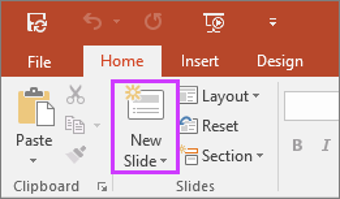
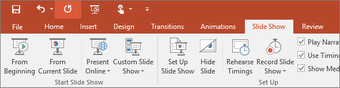
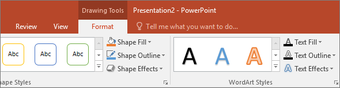
- User Interface Overhaul: One of the most noticeable changes in PowerPoint 2010 is its updated user interface. The ribbon was redesigned for better usability, with improved access to tools like themes, templates, and text formatting. This made creating presentations faster and more intuitive.
- Advanced animations and transitions: PowerPoint 2010 introduced more powerful animation features, allowing users to apply smooth transitions and effects that bring presentations to life. The ability to animate objects more precisely was a game-changer for creating professional and engaging content.
- Multimedia Integration: PowerPoint 2010 allows for better integration of multimedia. You can insert and edit videos and audio files more easily, enhancing the storytelling aspect of your presentations. The improved media playback options provide a smoother viewing experience for your audience.
- Picture editing tools: New tools for photo editing allowed users to crop, remove backgrounds, and apply various visual effects directly within PowerPoint. These features enabled more creative and polished presentations without needing external image-editing software.
- Co-authoring and collaboration: For the first time, PowerPoint 2010 introduced real-time collaboration features. Multiple users could work on the same presentation simultaneously, making it easier for teams to contribute and edit content.
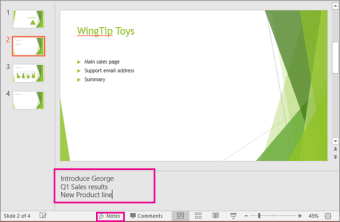
- Improved presenter tools: The Presenter View, available in PowerPoint 2010, gives speakers more control during presentations, displaying slides, notes, and upcoming slides on one screen. This feature is designed to help users stay organized and deliver more effective presentations.
Integrations and compatibility
While PowerPoint 2010 does not offer the cloud-based integrations that Microsoft 365 provides, it still offers several key functionalities:
- Microsoft Teams and OneDrive compatibility: Even though PowerPoint 2010 is not part of Microsoft 365, it is compatible with Microsoft's collaborative tools like Teams and OneDrive. You can easily upload your presentations to OneDrive for sharing and collaboration. Additionally, presentations created in PowerPoint 2010 can be used in Teams meetings, albeit without the real-time collaborative features of newer versions.
- Cross-platform compatibility: PowerPoint 2010 is designed to work seamlessly with Windows-based devices. If you're looking to download Microsoft PowerPoint 2010 for Windows, ensuring your system meets the minimum requirements (outlined below) to ensure smooth performance is important.
System requirements for PowerPoint 2010
Before downloading PowerPoint 2010 for Windows, it's essential to check whether your system meets the minimum requirements. PowerPoint 2010 was designed to run efficiently on most Windows systems, but there are certain hardware and software specifications to keep in mind:
Operating system: Windows XP, Windows Vista, or Windows 7
Processor: 500 MHz processor or higher
Memory (RAM): 256 MB RAM minimum (512 MB recommended)
Hard disk space: 1.5 GB of available disk space
Graphics: DirectX 9.0c-compatible graphics card with 64 MB video memory
Display: 1024 x 768 screen resolution or higher
Internet connection: Required for online features (e.g., updates)
PowerPoint 2010 is incompatible with newer operating systems like Windows 8 or Windows 10 without some performance limitations. If you're running an older version of Windows, however, you should be able to use PowerPoint 2010 without issues.
PowerPoint 2010’s role in Microsoft 365
Though Microsoft PowerPoint 2010 is no longer part of the core Microsoft 365 suite, it remains a valuable tool for users who prefer or need to use older software. As Microsoft 365 has evolved, newer versions of PowerPoint are now included in the suite, with frequent updates and enhanced features, including integration with cloud storage, enhanced collaboration tools, and deeper connectivity with Microsoft Teams.
If you’re interested in using PowerPoint 2010 with Microsoft 365 services, you can still upload and share your PowerPoint 2010 files via OneDrive or Teams. However, newer versions of PowerPoint available through Microsoft 365 will provide additional features such as cloud-based collaboration, better security, and seamless syncing across devices.
Is PowerPoint 2010 right for you?
Microsoft PowerPoint 2010 is still a solid choice for users who need a dependable presentation tool without needing the latest updates and cloud-based features. While Microsoft 365 offers more advanced capabilities, PowerPoint 2010 is an effective solution for users who prefer a simpler, familiar interface.
Before downloading Microsoft PowerPoint 2010 for Windows, ensure your system meets the requirements, and consider your cloud integration and collaboration tools needs. If you don’t need the advanced features of Microsoft 365, PowerPoint 2010 can still help you easily create professional presentations.













_250x250.png)